
I’m Mayantha, a freelance Shopify and WordPress developer running Fixerlinks. Shopify’s built-in Collabs tool makes it possible to launch a basic affiliate program in an afternoon, but most of the store owners I work with hit a wall within a few weeks: no tiered commissions, no bulk creator recruiting, and a payout flow that doesn’t scale past a handful of partners. This year alone I’ve built affiliate and creator programs for stores like Nagerteppich in Germany, NuDay in the UAE, and Orija Design and USCA Academy in Canada — and the setup process looks almost identical every time, whether the store ends up on Shopify Collabs or a dedicated app like BixGrow, GoAffPro, or UpPromote.
This guide walks through exactly how I set up a Shopify affiliate program in 2026: which tool to pick, how to structure commissions, and the steps that take a store from zero affiliates to a repeatable referral channel.
Why Add an Affiliate Program to Your Shopify Store?
An affiliate program turns people who already like your products into a paid-on-performance sales channel. You’re not buying clicks or impressions — you’re paying a commission only after a real sale happens, which makes it one of the lowest-risk ways to grow a Shopify store’s traffic and revenue.
- You only pay for actual sales, not clicks or ad impressions
- Existing customers and micro-influencers already talk about your products — an affiliate link gives them a reason to keep doing it
- It compounds: every affiliate you recruit becomes a permanent traffic source
- Affiliate content (reviews, comparisons, tutorials) keeps sending traffic long after it’s published, unlike a paid ad that stops the moment you stop paying
Shopify Collabs vs. a Third-Party Affiliate App
The first real decision is where your affiliate program lives. Shopify Collabs ships free inside every Shopify store and is genuinely the fastest way to start: you invite creators, set a commission, and Shopify handles tracking and payouts for a small processing fee. A dedicated app like BixGrow, GoAffPro, or UpPromote costs a monthly fee on top of your Shopify plan, but unlocks tiered commission structures, custom affiliate portals, and automation that Collabs doesn’t offer natively.
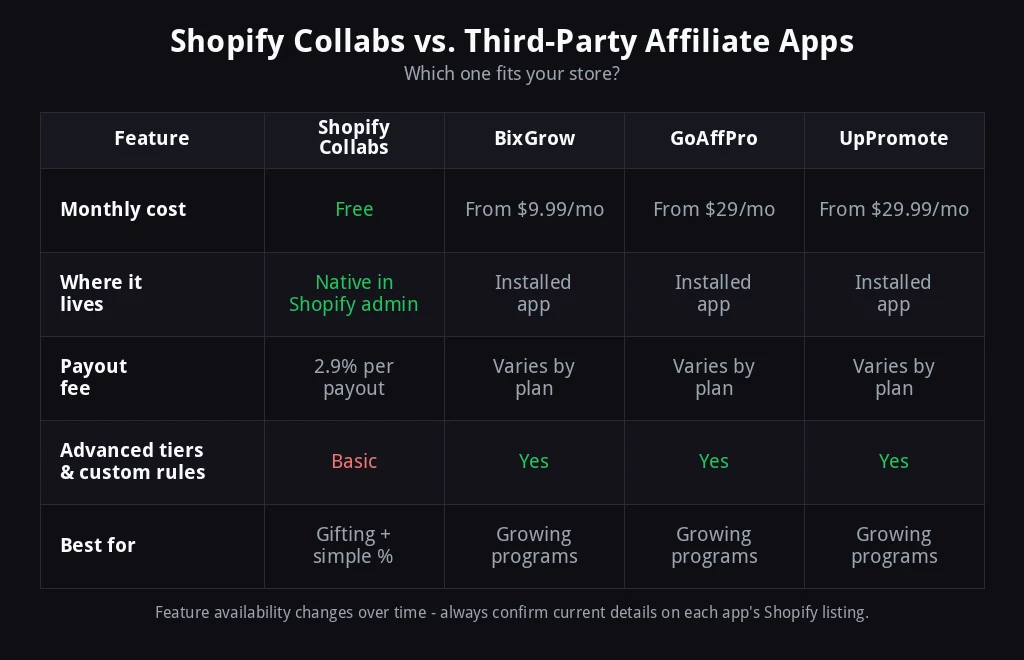
In practice, I start almost every new client on Shopify Collabs. It’s free, it’s already inside the admin they know, and it proves out the offer — the commission rate, the messaging, the kind of creator who actually converts — before spending money on software. I only move a store to a dedicated app once the program has outgrown flat-rate commissions or the merchant wants a self-serve application page for new affiliates to sign up on their own. If you want a deeper side-by-side of the three most common apps, I compared BixGrow, GoAffPro, UpPromote and FirstPromoter in a separate breakdown.
5 Steps to Launch Your Shopify Affiliate Program

1. Decide Between Shopify Collabs and a Dedicated App
If you want to gift free product and pay a single flat percentage, Collabs will cover you on day one. If you already know you’ll need multiple commission tiers, a public application page, or fraud protection on high volumes of affiliates, it’s worth starting directly on an app so you’re not migrating data later.
2. Set Your Commission Structure
Most of the Shopify stores I work with land somewhere between 10% and 20% of the sale price, though physical products with thin margins sometimes sit closer to 5-8% while digital products and courses can go well above 20%. Decide up front whether the commission applies to the full order or just the referred product, and whether you’ll also offer a discount code so the customer gets something too — that combination is usually what convinces a creator’s audience to actually click through.
3. Recruit Your First Creators
Don’t start with cold outreach to strangers. The fastest first ten affiliates almost always come from people already connected to the brand: past customers who left a great review, staff and friends of the founder, and micro-influencers in your niche who post about products like yours anyway. Send a short, specific invite explaining the commission and how the link works — the easier it is to say yes, the faster the program fills up.
4. Give Every Affiliate a Trackable Link
Whether you’re on Collabs or an app, every affiliate needs a unique link or discount code so a sale can be attributed to them automatically. Don’t rely on manual tracking or “just tell us your name at checkout” — it breaks down within the first week and creates disputes over who gets paid for what.
5. Track Results and Pay on Time
Review clicks, conversions, and payouts on a set schedule — weekly while you’re small, monthly once the program is running itself. Paying late is the single fastest way to lose an affiliate who was otherwise sending you good traffic, so build the payout date into your calendar the same way you would a payroll date.
Common Mistakes I See Shopify Merchants Make
- Setting commissions too low to attract serious affiliates — a 3% commission rarely motivates anyone to put in real effort.
- Launching without testing the signup and checkout flow — broken tracking on day one loses trust with your first affiliates fast.
- No clear written terms — cookie duration, what counts as a valid sale, and when refunds claw back a commission should all be spelled out before you recruit anyone.
- Recruiting broadly instead of starting close to home — existing customers convert far better as affiliates than cold strangers do.
- Tracking payouts in a spreadsheet past the first dozen affiliates — this is exactly where a dedicated app starts paying for itself.
FAQ: Shopify Affiliate Programs
Is Shopify Collabs free?
Yes. Shopify Collabs is included with a Shopify subscription at no extra monthly cost. Shopify takes a small processing fee out of each commission payout, but there’s no separate app subscription to pay.
How much commission should I offer Shopify affiliates?
Most physical-product Shopify stores offer somewhere between 10% and 20% per sale. The right number depends on your margins and how competitive your niche is for affiliate attention — digital products and subscriptions can usually afford to offer more.
Can I run an affiliate program without installing an app?
Yes. Shopify Collabs is built directly into the Shopify admin, so you can run a complete affiliate program — invites, tracking links, and payouts — without installing anything.
How long does it take to set up a Shopify affiliate program?
A basic Shopify Collabs program can be live within a day. A fuller setup with a dedicated app, custom commission tiers, and a branded affiliate application page typically takes me a few days to a week, depending on how much customization the store wants.
Do I need a separate landing page for affiliates?
Not to launch. Shopify Collabs gives creators an application flow without any extra page needed. As the program grows, a dedicated affiliate landing page — explaining the commission, the terms, and how to apply — makes it easier to recruit affiliates who find you on their own instead of only the people you personally invite.
If you’d rather have this built and tested for you, that’s exactly what my affiliate program setup service covers — commission strategy, app selection, and a working program handed back to you ready to recruit affiliates into. Have a specific question about your store first? Ask me directly and I’ll get back to you.