
AdSense Low Value Content Error Solved
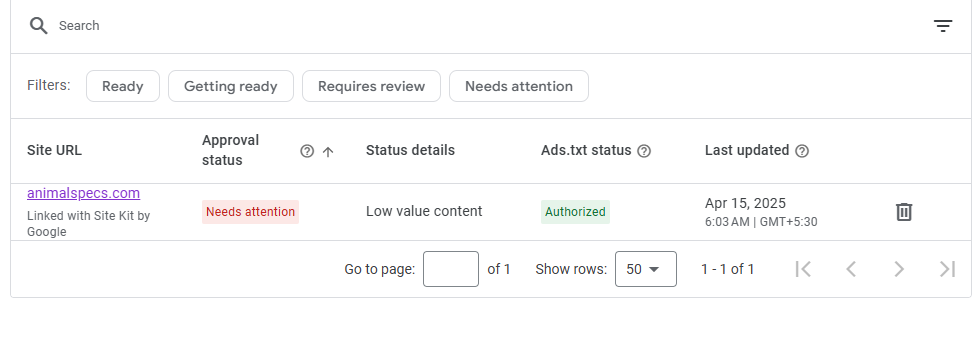
Why is my website showing AdSense Low Value Content?
The Problem
Free – Top Rated Freelancer
Quick Complete Guide
✅ 1. Understand why you got AdSense Low Value Content Error
Google thinks your site has one or more of these:
✔ Thin or short articles
✔ Too much copy-paste or AI-only content
✔ Pages with no search intent
✔ Too many ads, banners or affiliate links
✔ Bad structure, no internal links
✔ Auto-generated category/tag pages
✅ 2. Fix your content: what to do
🔥 Write articles with real value
Aim for:
👉 1000+ words
👉 Step-by-step solutions
👉 Add examples, screenshots, tools, prices, pros/cons
Make it helpful to a real human — not just keywords.
✅ 3. Remove or rewrite low quality pages
Delete or improve:
❌ Very short posts
❌ Duplicate content
❌ Auto-generated pages (tags, categories)
❌ Irrelevant topics
You can noindex tag/category pages..
✅ 4. Add Search Intent
For every article, ask:
➡ What problem am I solving?
➡ Who is searching this?
➡ What result do they want?
Example:
Instead of “Best keyboards” Write: “Best mechanical keyboards for gaming under $50 (Tested results)”
✅ 5. Improve formatting
Google loves structure.
👍 Add:
✔ Headings H2/H3
✔ Bullet points
✔ Tables
✔ Comparison sections
✔ FAQs
✔ Internal links
✅ 6. Add E-E-A-T (very important)
✔ Experience – talk from your real tests or use cases
✔ Expertise – show you know the topic
✔ Author bio – photo + description
✔ Contact page
✔ About page
✅ 7. Remove aggressive monetization
❌ Don’t put too many ads or affiliate links.
Rule: ➡ Max 3 affiliate links per 1000 words
✅ 8. Fix technical issues
Check:
✔ Mobile-friendly
✔ Fast loading (use PageSpeed Insights)
✔ HTTPS
✔ No broken links
🚀 9. Update sitemap & request review
After fixing:
-
Update sitemap in Search Console
-
Request review in AdSense
🎯 Summary
To fix Low Value Content:
👉 Create helpful, original, long content
👉 Fix structure & formatting
👉 Add E-E-A-T
👉 Reduce ads/links
👉 Improve technical performance
Do this → approval rate becomes very high.
Can't find the service you need?
Tell us your specific request, and we’ll find the perfect expert for you.

Mayantha Randunu
Founder of Fixerlinks with 7+ years building websites and software, and matching clients with vetted freelancers.
Some of the links on this website are affiliate links. This means if you click and make a purchase or sign up, we may receive a small commission — at no extra cost to you. We only recommend products or services that we believe will add genuine value to our readers.