
Why does this problem happen
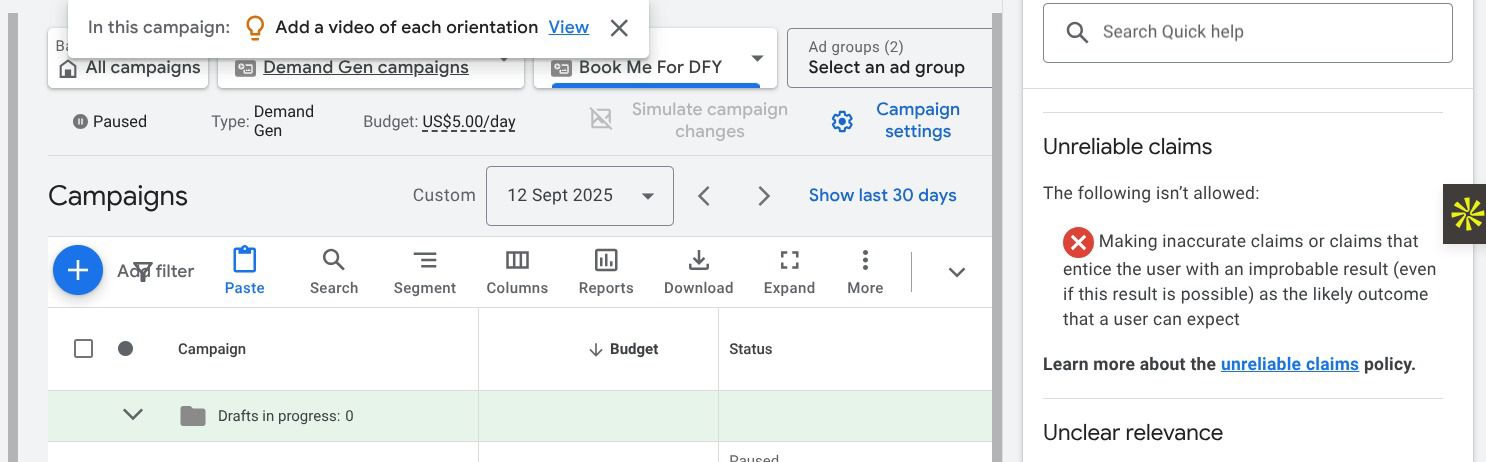
It’s frustrating to face these errors after all your hard work. But here, I will guide you on how to completely solve this issue and get approved by Google AdSense. The unreliable claims google ads error happens when Google thinks that your landing page promises something that sounds too good to be true or is not clearly explained.
Many website owners believe that strong marketing language is normal — but Google evaluates ads from a user trust perspective, not a sales perspective. ( So we should have to think from the user’s end when doing a blog ) If claims are unclear, exaggerated, or unsupported, Google blocks the ad to protect users. So how can you solve this? Lets go step by step.
Step 1: Review your main headline and promises
What to do (WP Dashboard):
- Go to Pages → All Pages
- Edit the landing page used in the ad
- Carefully read the headline, subheading, and call-to-action
Why this matters:
Google checks the most visible claims first.
What usually goes wrong:
- “Guaranteed results”
- “Instant success”
- “No effort required”
When using claims like these, those sound kinda spammy. So if you are using these terms article should be 100% descriptive and 100% trustworthy. So always be aware when using these types of claims. You should have to be responsible.
Step 2: Add real proof to support your claims
What to do (WP Dashboard):
Edit the page and add:
- Real screenshots
- Case studies
- Genuine testimonials (no stock names)
- Process explanations
Use the WordPress block editor to place them near the claims.
Why this matters:
Claims without proof are treated as unreliable.
What usually goes wrong:
- Fake-looking testimonials
- Stock images used as evidence
So don’t forget to be real always. If you are proving something, you have to show proof.
Step 3: Remove or soften absolute wording
What to do (WP Dashboard):
- Edit page content
- Replace absolute terms like these: Remember your terms may be different from below terms, Just get the idea from the below terms, Then it will be easier to notice those terms.“100% guaranteed.”
“Best in the world”
“Works for everyone.”
With:
- “Results may vary”
- “Based on customer experience”
- “Designed to help”
Why this matters:
Absolute promises trigger automated policy checks.
What usually goes wrong:
- Owners leave one strong sentence unchanged
- Ads keep getting disapproved
Step 4: Add transparency and business information
What to do (WP Dashboard):
-
Ensure these pages are built and are linked properly. Make sure these pages are accessible through the header menu or footer menu.
-
- About Us
- Contact Us
- Privacy Policy
-
Add visible contact details on the landing page or footer.
- Also, when it comes to blog posts, don’t forget to add the author info on the single post page. Like you can see at the bottom of this page.
Why this matters:
Google trusts transparent businesses more. Its kinda like having a healthy affair with your wife. We need to be transparent enough to live with fewer conflicts. If we got hidden info, They will become suspicious.
What usually goes wrong:
- Landing page looks like a sales funnel only
- No clear business identity
Step 5: Clarify how results actually work
What to do (WP Dashboard):
-
Add a short section explaining:
-
- How the product/service works
- What users should realistically expect
- Any limitations or conditions
Keep the language simple and honest. It will be easier and more comfortable for the users.
Why this matters:
Clarity reduces misleading interpretations.
What usually goes wrong:
- Only benefits listed, no explanation
- User expectations left unclear
Step 6: Check ad copy matches the landing page
What to do:
- Open your Google Ads ad
- Compare ad text with landing page claims
- Make sure they say the same thing
Why this matters:
Mismatch increases policy risk.
What usually goes wrong:
- The ad promises more than the page delivers
- Google flags an inconsistency
Step 7: Request review after updates
What to do:
- Go to Google Ads → Policy Manager
- Select the disapproved ad
- Click Request review
Only do this after confirming all changes are live.
Why this matters:
Repeated reviews without fixes can hurt account trust.
Common mistakes people make
- Using exaggerated marketing language
- Keeping generic or fake testimonials
- No disclaimers or clarification
- Missing contact or business info
- Requesting review too early
These usually cause repeat disapprovals. Double check that you do these things
Experience note
In many cases, ads were approved simply by rewriting one or two sentences and adding visible proof. The page didn’t need a redesign — it needed honesty and clarity. Google’s systems are sensitive to how claims are framed, not just what is being sold.
When DIY may not be enough
If:
- You work in health, finance, or legal niches
- Claims are complex or regulated
- Ads keep getting disapproved after edits
Then a compliance-focused review is often needed to protect your ad account long-term.
🎯 Summary
To fix Unreliable Claims Google Ads:
👉 Review and soften strong claims
👉 Add real proof and transparency
👉 Match ad copy with landing page
👉 Explain results clearly and honestly
👉 Request review only after fixes
If you done these things correctly → ads usually get approved again ✅ Best wishes !
Don’t forget to leave us a comment once you have tested the above tips.
