
Summary
- This Technical SEO checklist is the infrastructure of SEO
- In 2026 it serves two distinct systems: Google’s crawlers AND AI retrieval engines like ChatGPT and Perplexity
- These 10 items are ordered by impact — fix them in sequence, not randomly
- Most fixes take under an hour and require no developer or agency
- Biggest wins: indexing errors, Core Web Vitals, internal linking structure, and AI-readable content formatting
Here is something most SEO content gets wrong about technical audits.
People treat them like a one-time project — something you configure at launch and never revisit. Then they spend months building backlinks and publishing content and wondering why rankings are not moving. The answer is almost always the same: something is broken at the technical layer and quietly undoing everything else.
A site publishing solid content three times a week, with decent backlinks, targeting the right keywords — sitting on page three for months. A crawl reveals half the pages are not indexed due to a sitemap conflict, images are loading at 2MB each, and a broken plugin is throwing JavaScript errors on every page load. Fix those three things and rankings start moving within six weeks. Every time.
I Have also published an article about SEO cluster too – You can read it from here , full SEO cluster breakdown
Technical SEO is not glamorous. It does not give you the immediate feedback loop of a viral post or a new backlink going live. But it is the foundation that determines whether any of your other work pays off at all.
This checklist covers everything you need for 2026 — including the layer that most guides have not caught up to yet. In an era where content freshness is a critical signal for both crawlers and LLMs, your technical infrastructure now serves two distinct systems: Google’s ranking algorithm and the AI retrieval engines that are increasingly where your audience begins their search. Ignoring either one costs you.
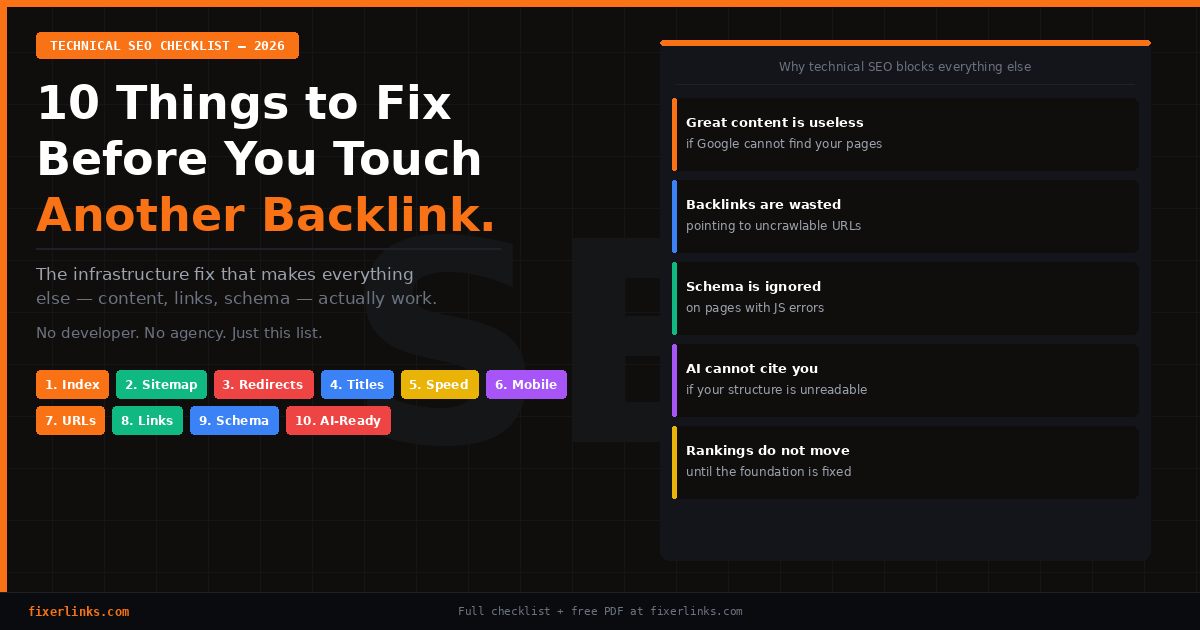
Work through this in order. Items at the top block everything below them. Fixing schema on a page Google cannot crawl is like polishing a car with a flat tyre.
1. Confirm Google Can Crawl and Index Your Pages
What you are fixing: The silent problem that makes every other SEO effort pointless.
Start here. Every time. Without exception. A single misconfigured setting can block your entire site from Google’s index and you will have no idea unless you check.
Open a browser and type site:yourdomain.com in Google. How many pages show up? If it is significantly fewer than your actual page count, something is blocking indexation.
Then go to Google Search Console → Indexing → Pages. Look at the Not Indexed tab. Every reason Google gives for not indexing a page is a specific, fixable problem:
“Crawled — currently not indexed” means Google read the page but decided it was not good enough to include. Thin content, near-duplicates, or a page without a clear distinct purpose. The fix is making the page more useful and specific — not stuffing keywords, but adding genuine depth and utility.
“Excluded by noindex tag” means a noindex directive is on a page you want ranked. In WordPress check Settings → Reading — if “Discourage search engines” is ticked, untick it immediately. Then check each page’s RankMath or Yoast panel individually. noindex gets toggled on accidentally more often than you would think, especially during bulk editing sessions.
“Discovered — currently not indexed” means Google knows the page exists but has not read it. In 2026, most content sites suffer from index budget issues — too many low-value pages burning the crawl budget that should go to your best content. Fix: noindex your tag pages, author archive pages, and thin paginated pages. Then request indexing on your important pages manually through the URL Inspection tool in Search Console.
Canonical tags are your second critical check. Every page should have exactly one canonical URL. If your site is accessible at both http:// and https://, or at both www. and non-www., you are splitting authority across duplicates. Pick one version, redirect all others, confirm the canonical tag in your SEO plugin matches. One version, always.
Beyond Google — if you care about AI search visibility, OpenAI, Anthropic, and Perplexity each run their own retrieval bots. Pages with noindex tags or crawl blocks may be invisible to these systems too, meaning you cannot be cited even when your content is excellent.
2. Submit and Maintain a Clean Sitemap
What you are fixing: The map that tells Google and AI crawlers exactly where your content lives — permanently.
Your sitemap is the XML file listing every URL you want discovered. Submitting it means new pages get indexed within hours rather than weeks — a meaningful difference when content freshness now affects citation rates in AI-generated answers.
Your sitemap is almost certainly at yourdomain.com/sitemap.xml. Open it and confirm it loads and lists your pages. If it does not, enable sitemap generation in RankMath under General Settings → Sitemap.
Then go to Google Search Console → Indexing → Sitemaps → type sitemap.xml → Submit. Done once. GSC monitors it automatically going forward.
What most people skip is maintenance. Check your sitemap monthly for two specific problems:
Noindexed pages appearing in the sitemap. You are sending Google a contradictory signal — “do not index this page” and “here it is in my official map” simultaneously. Your sitemap should only contain pages you actively want ranked. RankMath should exclude noindexed pages automatically — verify this is actually happening.
Low-value pages inflating your sitemap. Tag pages, author archives, date-based pages, and thin paginated content dilute your sitemap and waste crawl budget on pages that will never rank. Noindex these categories in your SEO plugin settings. A lean sitemap full only of your best content tells Google to spend its crawl resources where they matter.
3. Eliminate Broken Pages and Redirect Chains
What you are fixing: Dead ends that drain crawl budget and silently leak the authority you have built over time.
Every 404 error is a page Google visited that went nowhere. Every redirect chain — where URL A redirects to B which redirects to C — loses approximately 15% of link equity per hop and adds real, measurable load time.
Install Broken Link Checker (free WordPress plugin) or run your domain through Screaming Frog (free for up to 500 URLs). Both surface every broken internal link, broken image reference, and redirect chain across your site.
For broken internal links — update them to the correct destination. For broken external links — update to a working alternative or remove the link.
For redirect chains — find them and collapse each one to a single direct redirect. If you changed a URL six months ago and set up a redirect, check whether it points directly to the final destination in one step. A three-hop chain (A → B → C → D) should be one hop (A → D). Plugin updates, URL migrations, and redesigns all create chains silently. Audit them quarterly.
In Google Search Console → Indexing → Pages → filter by “Not Found (404).” Every URL listed was linked from somewhere — another page, an external backlink, a social post. Each one is receiving link authority that is disappearing into a dead end. Set up a 301 redirect from each broken URL to the most relevant live page. You recover that authority immediately.
Do not leave 404s on pages that had traffic or backlinks. That is direct ranking potential abandoned.
4. Audit Every Title Tag and Meta Description
What you are fixing: The organic listing that determines click-through rate before anyone reaches your site.
Your title tag is the clickable headline in search results. Your meta description is the two-line summary below it. Together they are the only thing a searcher sees before choosing to click you or your competitor — and most sites manage them carelessly.
The same elements matter in AI search. When ChatGPT or Perplexity retrieves your content, the page title is a primary relevance signal. A title that precisely matches a conversational query gets retrieved. A vague or generic title does not.
Run every important page through these rules:
Title tags: Unique across every page — no duplicates. Main keyword included naturally, not repeated or stuffed. Under 60 characters to avoid truncation in results. Written like something a human would actually want to click. The format that works consistently: Primary Keyword — Clear Outcome | Brand.
Meta descriptions: Unique across every page. Written like a short ad — what will the reader specifically get from clicking? Include your main keyword once. Under 155 characters. End with a subtle call to action where it makes sense naturally.
In RankMath the coloured score indicator on each post tells you what is wrong. Get every important page to green on both fields before moving on. Prioritise your homepage, service pages, and top-traffic posts — these are where poor titles cost you the most clicks every single day.
5. Hit Your Core Web Vitals Thresholds
What you are fixing: The three performance metrics Google uses as direct ranking signals — and that affect how frequently AI bots crawl and cite your site.
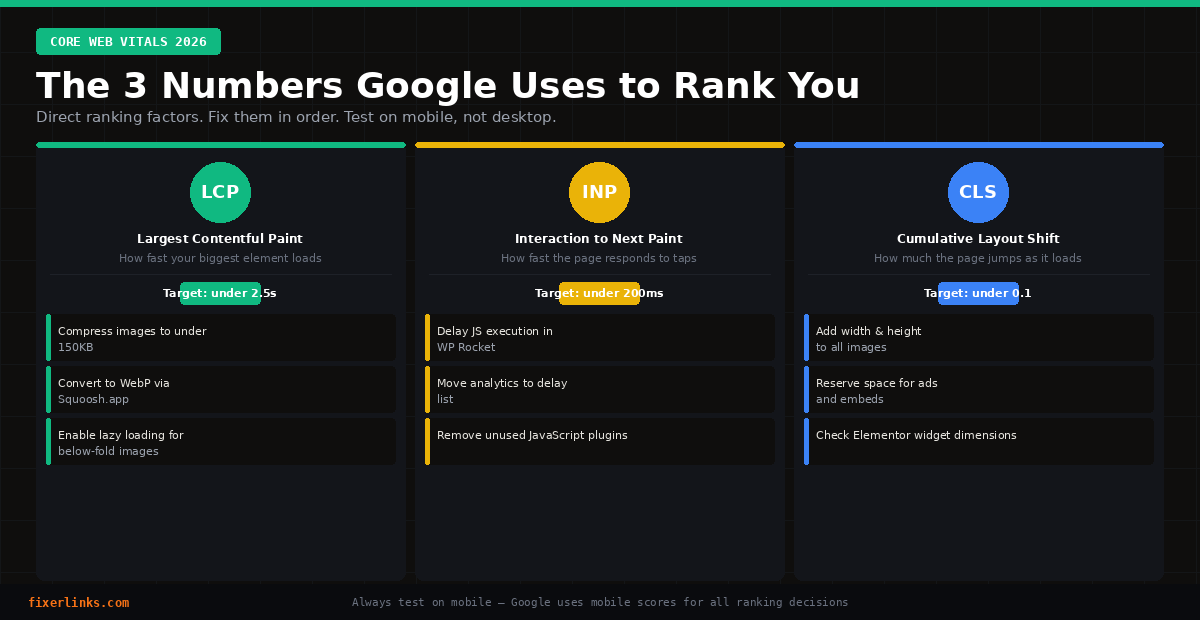
Go to pagespeed.web.dev and test your homepage and most important blog post. You need actual numbers on three metrics:
LCP (Largest Contentful Paint) — target under 2.5 seconds. Measures how long the biggest visible element takes to load — usually your hero image or main heading. Google’s Core Web Vitals guidance defines “good” as under 2.5s. If yours is over 4s, the cause is almost always an uncompressed image. Fix: compress it to under 150KB and convert to WebP via Squoosh.app, then re-upload.
INP (Interaction to Next Paint) — target under 200ms. Replaced FID in 2024. Measures how quickly the page responds when a user interacts. High INP means too much JavaScript on the main thread. Fix: install WP Rocket or WP Meteor, enable Delay JavaScript Execution, and add your heaviest third-party scripts — analytics, popup tools, chat widgets — to the delay list.
CLS (Cumulative Layout Shift) — target under 0.1. Measures how much the page jumps as it loads. Images without reserved dimensions push content down as they appear. Fix: add explicit width and height attributes to every image. WordPress handles this for images uploaded through the media library — Elementor widgets and custom HTML blocks sometimes miss them.
Over 70% of web traffic now comes from mobile devices. Always check PageSpeed scores on mobile — not just desktop. Mobile scores are consistently lower and Google uses mobile performance for all ranking decisions.
For images site-wide, install Imagify and run Bulk Optimisation. It converts your entire media library to WebP and compresses everything in one batch. Target: under 2MB total page size for content pages.
6. Verify Your Mobile Experience Works on an Actual Phone
What you are fixing: The version of your site Google ranks — because mobile-first indexing has been the standard since 2019 and is not changing.
Google ranks the mobile version of your site for all searches including desktop queries. A beautifully designed desktop site with a broken mobile experience ranks on the mobile performance.
The only reliable check is opening your site on a real phone — not Chrome DevTools emulation. Walk through your most important pages and check:
Text is readable without pinching to zoom. Body text should be at least 16px on mobile. Check this explicitly in Elementor’s mobile view for every section — Elementor sometimes inherits desktop sizes that are too small.
Buttons and links are large enough to tap accurately. Sites with touch targets that are too small are actively demoted in results. Every interactive element should be at least 44×44 pixels. The most common failures are social icons in headers, navigation items in compressed menus, and text links in footers.
Navigation works reliably after updates. Open your hamburger menu. Tap several links. Does each one navigate correctly? Does the menu close? Test this specifically after every theme or plugin update — these break mobile navigation more often than any other change.
Forms work end to end on mobile. Fill in your contact form and email opt-in on your phone. Are input fields large enough? Does the keyboard cover the submit button? Does submission complete successfully? Forms break quietly and often — test monthly.
Also check Search Console → Experience → Mobile Usability for pages Google has specifically flagged.
7. Clean Up Your URL Structure
What you are fixing: The addresses that signal relevance to crawlers and humans before a page is even loaded.
A clean URL does three things: tells Google what the page is about, sets accurate expectations for humans reading it in results, and keeps link equity flowing cleanly through your site architecture.
The rules:
Use your main keyword in the slug. yourdomain.com/technical-seo-checklist is descriptive and tells both Google and humans exactly what the page covers. yourdomain.com/?p=4721 communicates nothing.
Keep slugs short. If your title is “The Complete Technical SEO Checklist Every Website Owner Needs in 2026” the URL should be /technical-seo-checklist. Short slugs perform better in results, look cleaner when shared, and do not become outdated as years pass.
Avoid dates in URLs unless you publish news. Excessive URL parameters and date-based structures create duplicate content problems and crawl traps. A clean dateless slug stays relevant indefinitely.
When changing any existing URL — always, without exception, set up a 301 redirect from the old URL to the new one. Changing a URL without a redirect means Google treats it as a deletion. You lose every backlink pointing to the old address, every bookmark, and all authority accumulated there. Always redirect.
In WordPress set your permalink structure to “Post name” under Settings → Permalinks. This gives you clean keyword slugs automatically for every future post.
8. Build Internal Links With Intention
What you are fixing: The architecture that communicates page importance to Google and topical context to AI retrieval systems.
Internal linking is the highest-impact underused tactic in SEO. Every internal link simultaneously helps Google discover the linked page, passes authority from the linking page to the linked page, and signals topical relationship between two pieces of content.
No orphan pages should exist on your site. Pages with no internal inbound links are hard for Google to discover reliably and consistently underperform pages that are well-linked. If a page has content worth ranking, something should link to it.
The system:
Every new post links to at least three existing pages — two related blog posts and one conversion or service page. Use descriptive anchor text that includes the keyword of the linked page. “Our guide to [topic keyword]” is correct. “Click here” or “read more” gives Google no information about what the linked page is about.
Every new post gets linked to from at least two existing posts. After publishing, go back to two related posts and add a contextual link to the new one. A 10-minute habit that compounds month after month.
Your most important pages should have the most internal links pointing to them. If two of your pages compete for the same keyword, Google splits authority between them — neither ranks as well as a single consolidated page would. Map each important keyword to one definitive page and direct all internal links for that topic toward it.
Check Google Search Console → Links → Internal Links monthly. Your homepage and primary service pages should be at the top of that list. If they are not, your architecture is actively working against your conversion goals.
Every post on this site links to fixerlinks.com/find-an-expert/ at a natural point in the content. That is deliberate — it is the primary conversion goal and consistent internal linking builds its authority over time.
9. Add Schema Markup Without Touching Code
What you are fixing: The structured labels that tell search engines and AI systems exactly what type of content each page contains — and unlock rich result formats in search.
Schema markup is structured data that explicitly tells crawlers: this is a FAQ, this is an article, this is a business entity, this is a review. Without it, Google and AI systems have to infer what your content represents. With it, they know — and they reward you with richer, more prominent display formats.
In Google results, schema unlocks FAQ dropdowns that expand your listing, star ratings, breadcrumbs, and article metadata. These increase click-through rate without changing your ranking position.
In AI answer systems the effect is direct. Content buried in unstructured paragraphs is less likely to be retrieved by AI retrieval systems than content formatted with clear structured data labels. To be cited in an AI Overview or ChatGPT answer, your content needs to be extractable — and schema is part of making that happen.
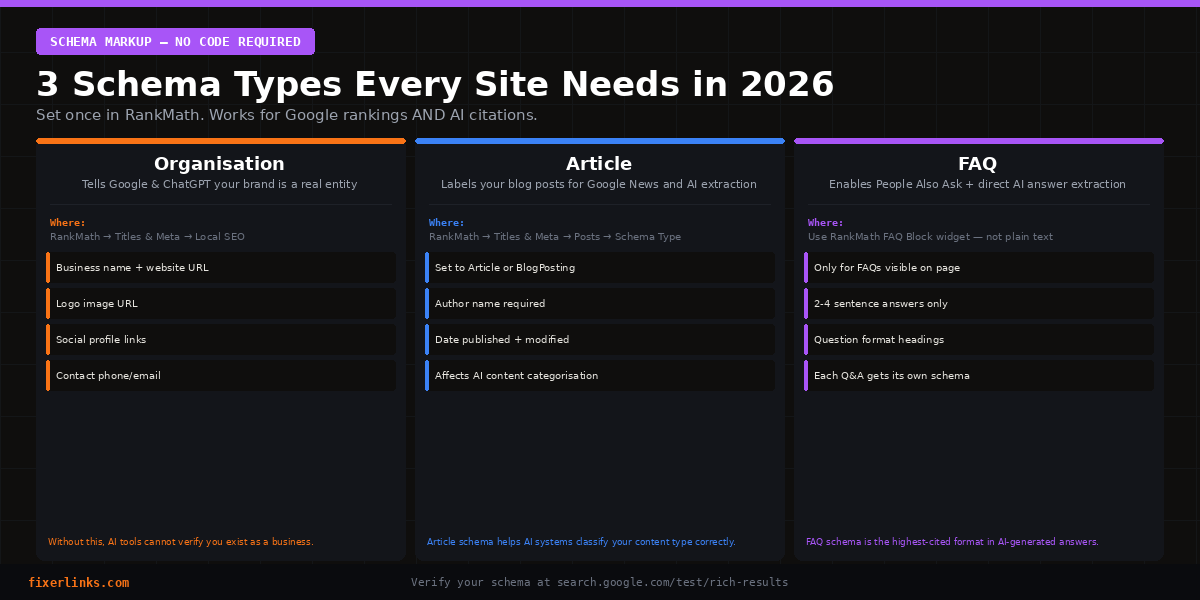
The three schema types every site needs, all executable through RankMath without writing code:
Organisation Schema — tells every system that your website represents a real, named business entity. RankMath → Titles & Meta → Local SEO → fill in business name, website URL, logo, social profiles, and contact details. This is how Google and ChatGPT verify your brand is established rather than anonymous.
Article Schema — labels your blog posts as articles written by a named human author with verifiable expertise. RankMath → Titles & Meta → Posts → set Schema Type to “Article” or “BlogPosting.” This affects how posts appear in Google News and how AI systems categorise content type.
FAQ Schema — marks up FAQ sections for extraction into Google’s People Also Ask section and AI-generated answers. In RankMath, always use the FAQ Block widget when adding FAQs — it generates the schema automatically. FAQs written as plain paragraphs receive no schema treatment regardless of how good the content is.
Verify your schema at search.google.com/test/rich-results. Paste any URL and it shows exactly which schema types are detected and any errors to fix.
10. Structure Every Page for AI Extraction
What you are fixing: Visibility in the search layer that is growing fastest — ChatGPT, Perplexity, Google AI Overviews — and will create the largest competitive gaps over the next two years.
SEO in 2026 is no longer only about Google rankings. Visibility, credibility, and influence across AI-generated answers is now equally important — and most sites are not optimising for it systematically. The ones that are will accumulate AI citation authority that becomes increasingly difficult to displace.
AI retrieval systems do not read a page from top to bottom. They scan for passages — short, clear, directly useful extracts that answer a specific question. The structure of your page determines whether they find those passages cleanly or miss them entirely.
The changes that consistently increase AI citation rates:
Add a TL;DR box at the top of every long post. Immediately after your H1, add a clearly labelled summary with three to five bullet points. AI tools scan these first and frequently quote them directly. This post has one — look at the top.
Front-load your direct answer. Every post answering a question should give the direct answer in the first 60 words, before any preamble. BLUF — Bottom Line Up Front — is the writing style AI retrieval systems prefer. Content buried in paragraph three does not get extracted.
Use H2 and H3 headings formatted as questions. “How Do You Fix a Broken Redirect Chain?” is more citable than “Redirect Management.” Question headings match conversational AI queries directly. They also appear in People Also Ask boxes in Google results.
Write FAQ answers in two to four sentences each. State the answer. Add one supporting detail. Stop. Longer answers are harder to extract as clean quotable passages. Counterintuitive for writers — but correct for AI extraction.
Update your most important pages every 30 days. Content freshness is a critical signal for both crawlers and LLMs. Pages updated within the last month are cited at a significantly higher rate than pages untouched for six months. Add a new FAQ, update a statistic, expand a section. Calendar reminder, monthly.
We covered the full strategy for this in our guide to how to rank on ChatGPT — if you want to go deeper on AI search optimisation specifically, that is the next read.
Your Monthly Technical SEO Checklist Routine
Technical SEO is maintenance work, not a one-time project. Sites break. Plugins update and cause conflicts. Images get uploaded at full resolution. URLs change without redirects. Redirect chains form silently every time a page moves.
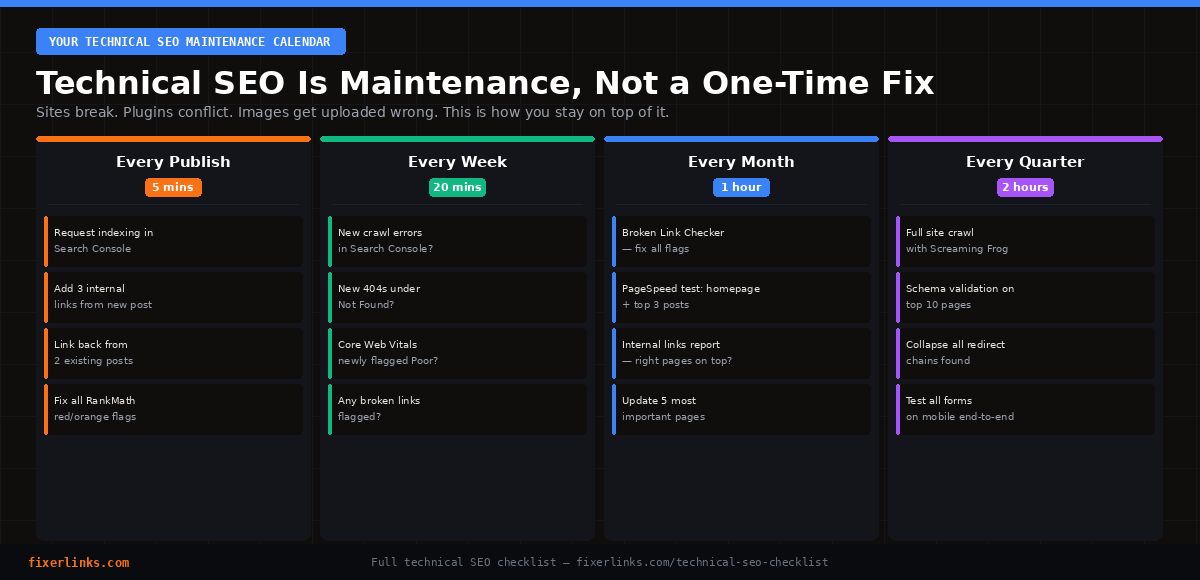
Every time you publish: Request indexing in Search Console. Add three internal links from the new post. Link back to the new post from two existing posts. Check RankMath — resolve all red and orange before publishing.
Every week — 20 minutes: New crawl errors in Search Console? New 404s? Core Web Vitals newly flagged as Poor? These are the three checks that catch problems before they compound.
Every month — 1 hour: Run Broken Link Checker and fix everything flagged. Test PageSpeed on homepage and top three posts. Check the internal links report — are your most important pages still receiving the most links? Update your five most important pages with something new.
Every quarter — 2 hours: Full site crawl with Screaming Frog. Verify schema on top 10 pages. Check for redirect chains. Test all forms on mobile. Review robots.txt for unintentional blocks.
The Tool Stack — Under £10/Month
| Tool | Purpose | Cost |
|---|---|---|
| Google Search Console | Indexing, crawl errors, Core Web Vitals | Free |
| RankMath | Schema, titles, sitemaps, redirects | Free / £49/year |
| Screaming Frog | Full crawl, chains, orphan pages | Free to 500 URLs |
| PageSpeed Insights | Core Web Vitals diagnostics | Free |
| Imagify | WebP conversion, bulk compression | Free / £4.99/month |
| WP Rocket or WP Meteor | Caching, JS deferral | £49/year or free |
| Rich Results Test | Schema validation | Free |
Frequently Asked Questions
What is the most important item on this technical SEO checklist? Indexing errors, if you have them. A page Google cannot index cannot rank regardless of anything else. After that, Core Web Vitals — LCP and INP are confirmed ranking factors with measurable thresholds. After that, internal linking — the highest-impact fix most sites are consistently under-doing.
How often should I run a technical SEO audit? Monthly: 15 minutes checking Search Console for crawl errors, indexation drops, and Core Web Vitals regressions. Quarterly: 2-4 hours running a full site crawl and checking for broken links, redirect chains, missing schema, and orphan pages. Annually: a deep audit covering server response times, JavaScript rendering, and security. Growth-stage sites should skew toward the more frequent end.
Does technical SEO affect ChatGPT and Perplexity citations? Yes, directly. AI retrieval bots use many of the same crawlability signals as Google. Pages that are slow, have broken JavaScript, carry noindex tags, or are absent from your sitemap can be invisible to AI crawlers. Beyond crawlability, the structural elements — TL;DR boxes, FAQ schema, question-format headings, and freshness — directly affect how often AI systems cite your content.
Do I need a developer for any of these fixes? For most items — no. Everything in this checklist is executable through Search Console, RankMath, and WordPress settings without touching code. The exception is complex JavaScript rendering issues or custom schema that plugins do not support natively. For those, you can find a vetted technical SEO specialist at FixerLinks without paying agency rates.
How long until technical SEO changes affect rankings? Indexing fixes can show impact within days once Google recrawls. Core Web Vitals improvements typically show ranking impact within 4 to 6 weeks. Full technical SEO overhauls generally show meaningful ranking movement within 4 to 12 weeks depending on site size and competition.
What is the difference between technical SEO and on-page SEO? Technical SEO is the infrastructure — crawlability, speed, indexing, schema, site architecture. On-page SEO is the content layer — keyword targeting, heading structure, content depth, meta descriptions. They overlap but solve different failure modes. Technical problems block on-page work from paying off. If your technical foundation is clean and rankings are still low, the problem is content quality or authority, not infrastructure.
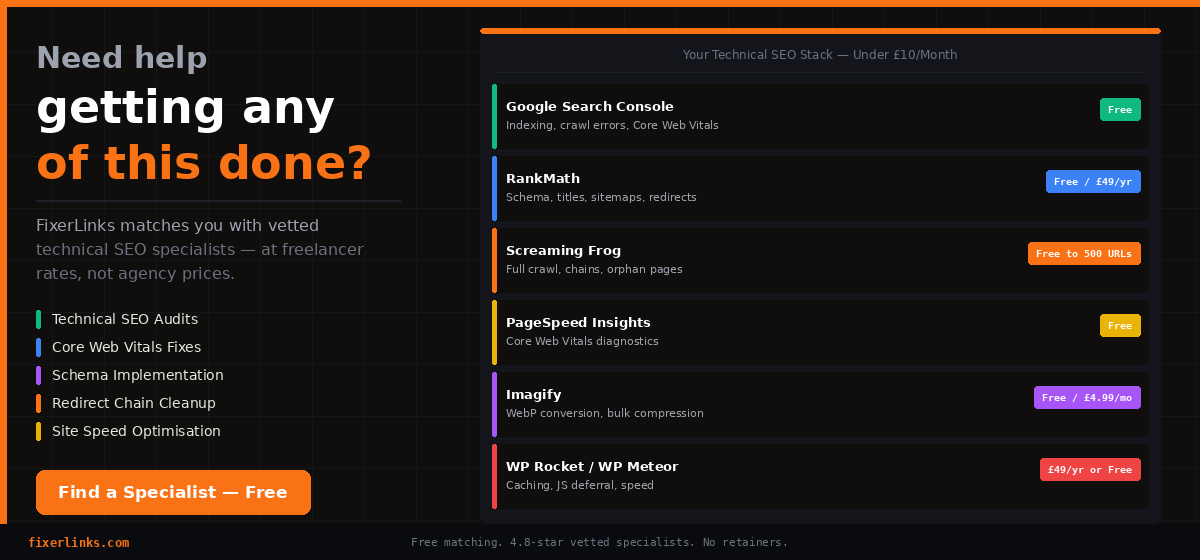
Need Help Getting Any of This Done?
This checklist is built to be self-executable for anyone managing their own site. But some fixes — particularly full site crawls, redirect chain audits across large sites, JavaScript rendering issues, and Core Web Vitals optimisation — are faster and more reliable when handled by someone who does this daily.
If you want your technical SEO properly sorted in one focused engagement rather than weeks of working through it yourself, FixerLinks matches you with vetted technical SEO specialists at freelancer rates — no agency markup, no retainers.
Find a Technical SEO Specialist → fixerlinks.com/find-an-expert/
Published by FixerLinks.com — free freelancer matching for website owners, bloggers, and digital entrepreneurs.